Receipt designer

Design your receipts, see exactly what prints

A visual editor for thermal receipts, packing slips and kitchen tickets. Drag in text, logos, QR codes and barcodes, drop in your WooCommerce order fields, and preview it with real-looking data. Try it right now in your browser, no account needed.
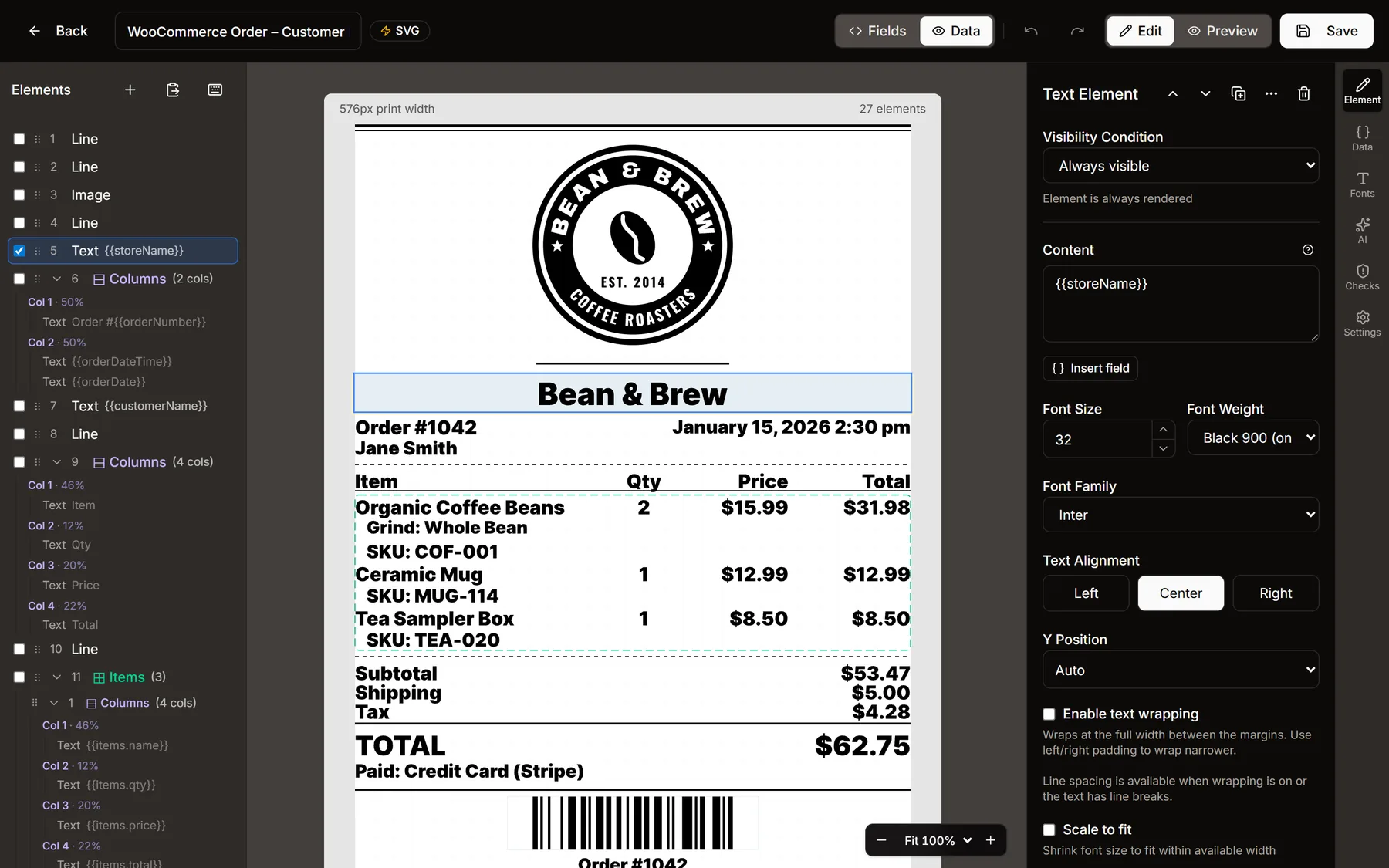
The ReceiptKit designer editing a WooCommerce customer receipt: the element list on the left, the receipt on the canvas, and the selected store name's settings on the right
The WooCommerce customer receipt in the designer, with sample data on and the store name selected.
Built for WooCommerce

Your order fields, one click away

Most ReceiptKit stores print WooCommerce orders, so the designer knows what a WooCommerce order carries.

Click Insert field on any text and pick from the order’s fields: order number, date, customer name, totals, shipping, tax, payment method, customer note. Line items repeat once per product, with their quantity, price, SKU and options underneath.

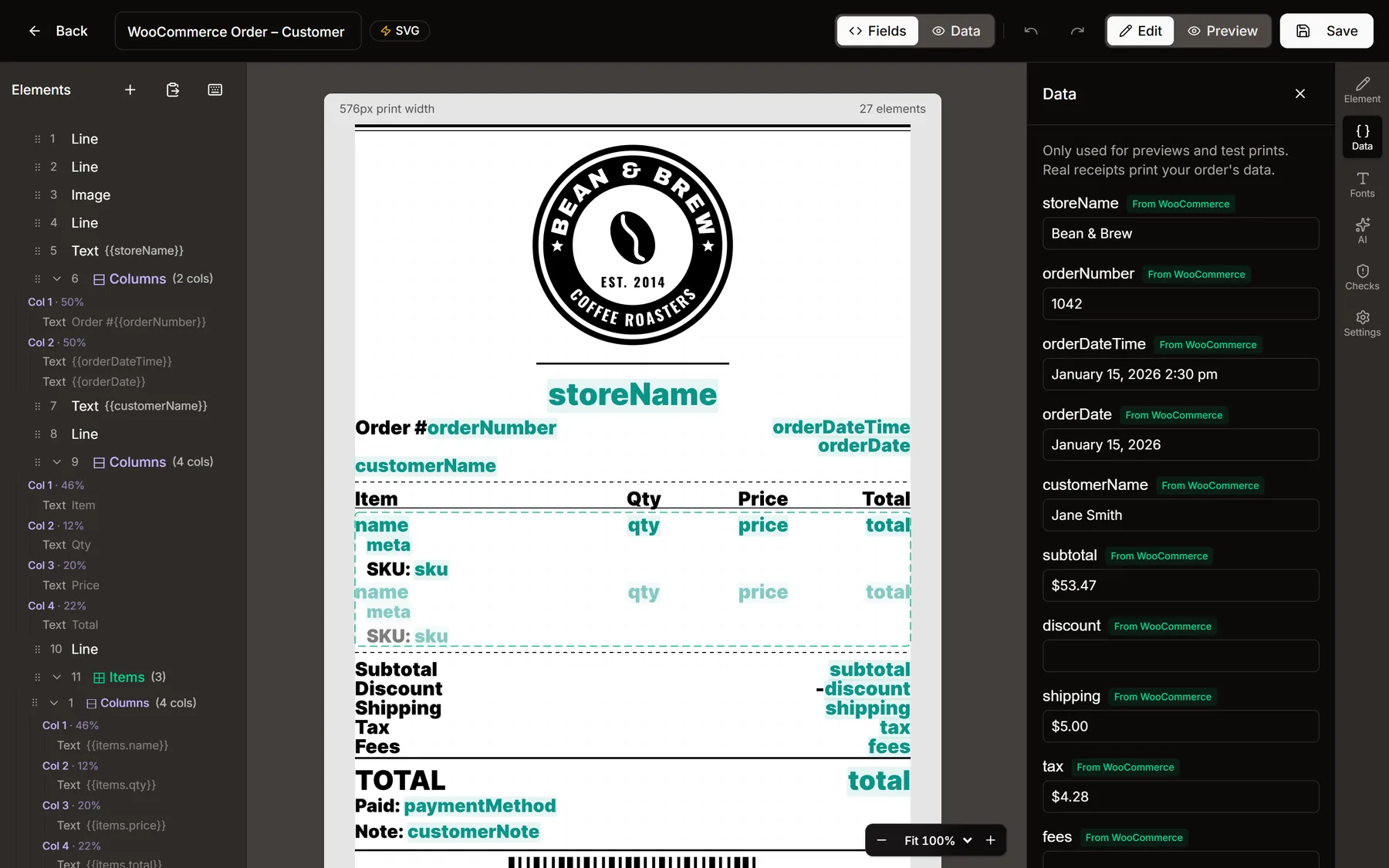
The Data panel holds the sample values you see on the canvas. They are only for previews and test prints: real receipts print each order’s own data. Need something WooCommerce doesn’t send? Type a new name in the field picker and it becomes your own field.

Start from one of the 12 WooCommerce and Orderable templates, from customer receipts to kitchen tickets, and make it yours. Printing orders automatically is covered on the WooCommerce receipt printer page.
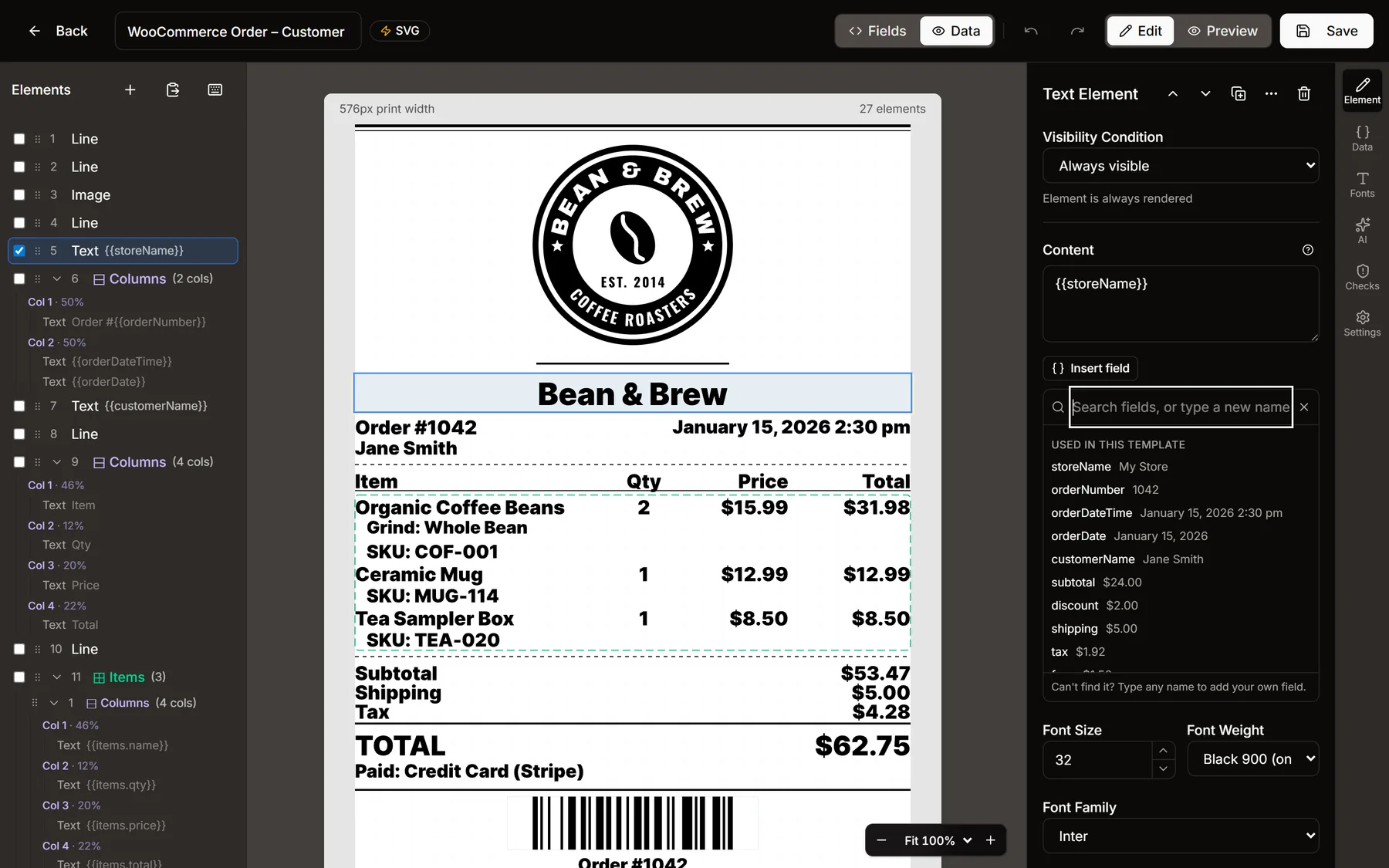
The Insert field picker open on a text element, listing the WooCommerce order fields with their sample values
Insert field lists every field the template uses, with its sample value.
The Data panel with WooCommerce sample values, next to the receipt showing field names in place of values
Fields view: each field shows by name on the canvas, and the Data panel holds the sample values for previews.
Everything on a receipt

The building blocks

Text with fields

Mix fixed text and fields like {{orderNumber}}. Wrap long lines, or shrink text to fit the width so a long product name never runs off the paper.

Logos and images

Upload a logo and it is converted to black and white and scaled to the paper, the way a thermal printer prints it.

QR codes and barcodes

QR codes for reviews, receipts or order links, and CODE128, EAN-13, EAN-8, UPC and CODE39 barcodes, filled from any field.

Columns and groups

Line up item, quantity and price in columns. Group elements to move them together, or set a group to repeat once per line item.

Show or hide by rule

Print a line only when a field has a value, is empty, is zero, equals or contains something, or is above or below a number. No $0.00 discount lines.

Any paper width

58 mm and 80 mm paper, the 512 px width of 80 mm Epson TM-T88 and TM-T70 printers, or a custom width.

Fonts

Type that survives thermal paper

Pick from 45 font families with real bold and black weights, chosen from printed test sheets rather than screenshots. The designer warns you when text is too small or too thin to print cleanly.

The Fonts panel changes a font, size or weight everywhere it is used in one step. The canvas previews the change as you pick, and you can test print it before applying. The measurements behind the size floors are on the thermal receipt fonts page.
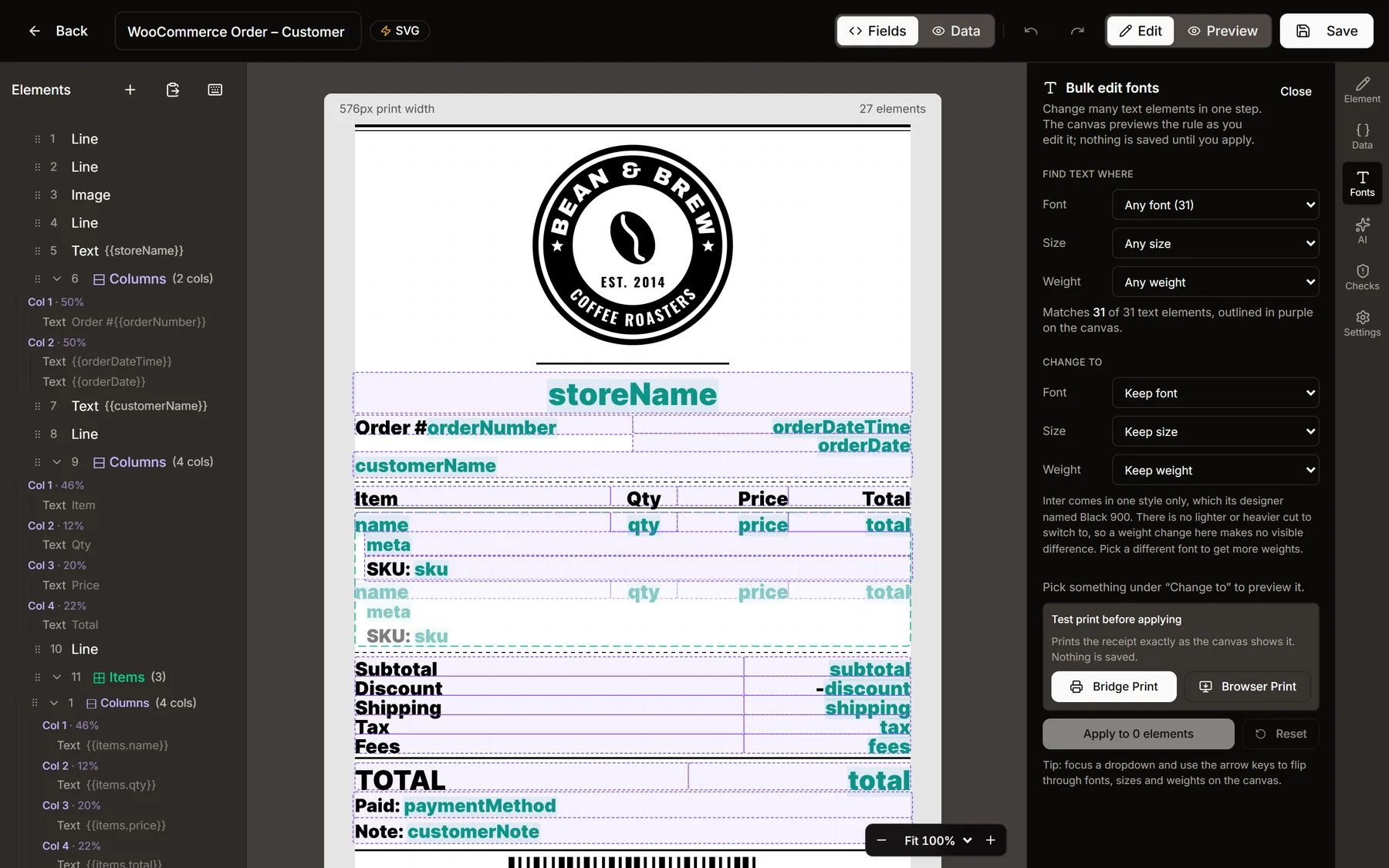
The Bulk edit fonts panel matching every text element on the receipt, outlined in purple on the canvas
Bulk edit fonts: find text by font, size or weight, then change it everywhere at once.
Before it prints

Catch problems on screen, not on paper

Template checks read the receipt the way a thermal printer will and point out what would print badly: text that is too small or not bold enough to read, an image or barcode wider than the paper, a QR code too small to scan, a price field that would print $0.00 instead of hiding, header columns that don’t line up with the items, and long item names that would get cut off. Each one shows where it is, and where there is a fix, you tick it and apply it as one undo step.

Preview and print

See the real receipt, then test print it
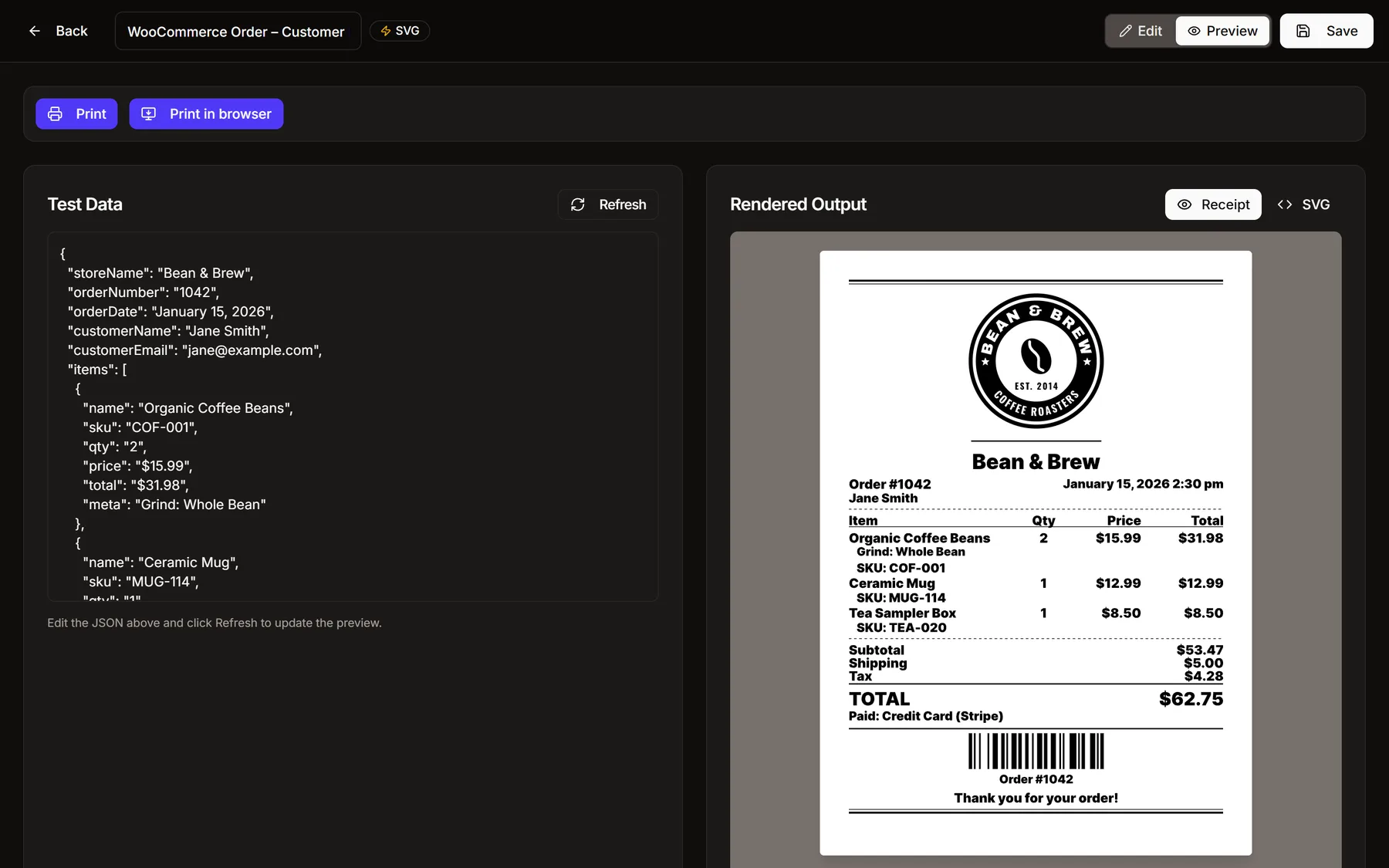
Preview mode: the test data as JSON on the left and the rendered receipt on the right, with Print and Print in browser buttons
Preview: edit the test data and the receipt redraws exactly as the printer receives it.

Preview renders the receipt with the same engine that prints it. Change the test data and it redraws, so you can try a long order, a missing customer name or a discount before a real one arrives.

Print in browser sends it to any printer installed on your computer, free and without installing anything. Print sends it to a receipt printer through the ReceiptKit bridge, which is how orders print on their own.

Details

The small things that save time

Edit on your phone

The canvas takes the screen, panels open from a bar along the bottom, and elements drag with your finger.

AI assistant

Describe a change in plain words, like “Add a tip line below the total”, and it makes the edit. One undo takes it back.

Undo, redo and history

Every change undoes. Saved templates keep their earlier versions, and restoring one is just another edit.

Never lose work

Unsaved changes are kept in your browser, so a crash or a closed tab offers them back.

Copy and paste

Copy elements between templates, duplicate them, and use keyboard shortcuts for the common moves.

Zoom

Fit the receipt to the window or zoom in to line up the details.
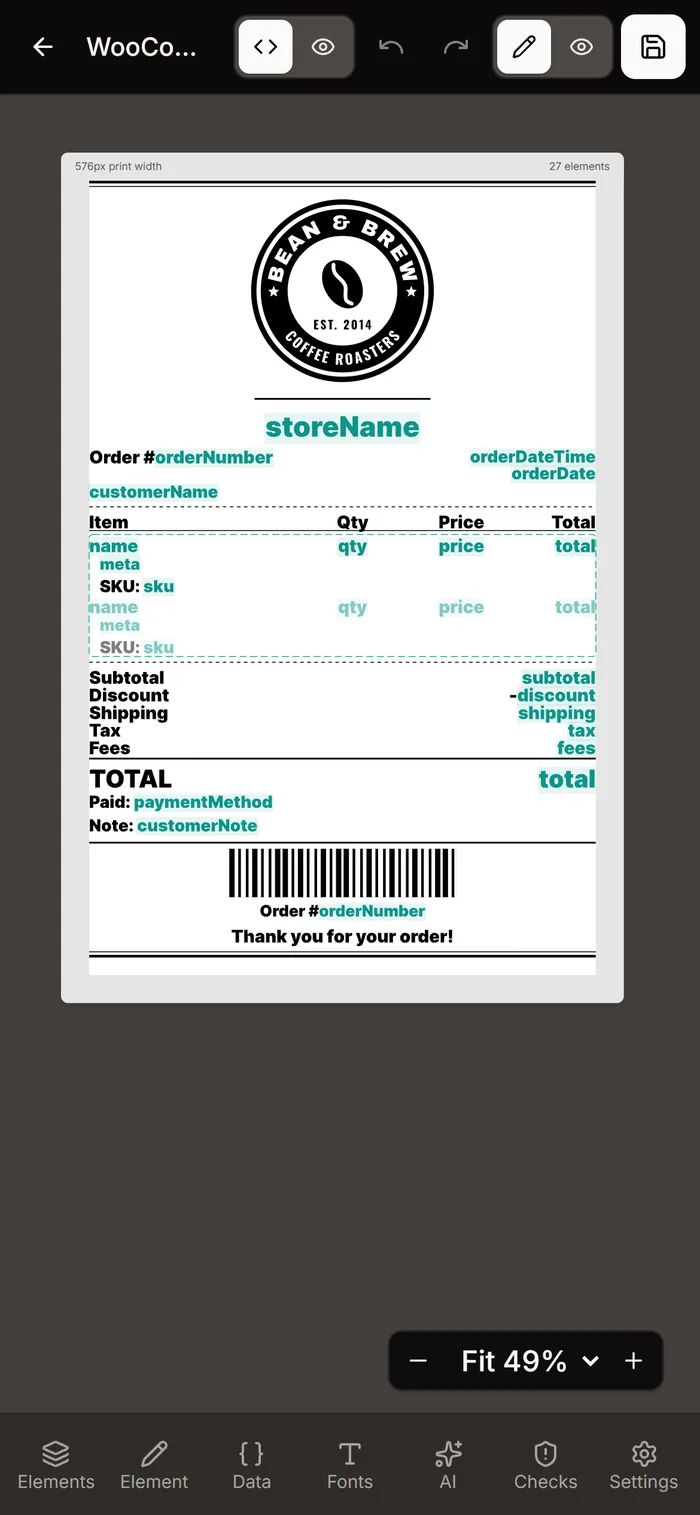
The designer on a phone: the receipt fills the screen with the panel bar along the bottom
Start from a template

Open any of them in the designer

Each one opens in the designer in a new tab. Edit it, preview it and print it from your browser; create an account when you want to keep it.

WooCommerce and Orderable

WooCommerce Order – Customer ReceiptA branded customer receipt for WooCommerce orders: store header, order number & date, itemized line items with SKU and variations/add-ons, subtotal/discount/shipping/tax, total, payment method, customer note, and an order barcode. Field names match the ReceiptKit for WooCommerce plugin.
WooCommerce Order – Packing SlipA no-prices fulfillment slip for picking and packing WooCommerce orders: order number, ship-to address, item list with SKU and quantity, customer note, and an order barcode. Field names match the ReceiptKit for WooCommerce plugin.
WooCommerce Order – Kitchen TicketA large-format, high-contrast kitchen/prep ticket for WooCommerce food orders: big order number, time, pickup/delivery method, oversized item lines with quantities and highlighted modifiers, and the customer note. Field names match the ReceiptKit for WooCommerce plugin.
WooCommerce Order – Delivery/Pickup TicketA driver/handoff ticket for WooCommerce delivery and pickup orders: fulfillment method and time slot huge at the top, big order number, customer name & phone, delivery address, items with modifiers, and the customer note. Field names match the ReceiptKit for WooCommerce plugin.
WooCommerce Order – Gift ReceiptA gift receipt for WooCommerce orders with all prices hidden: store header, order number & date, items with SKU and variations, an exchange-policy footer, and an order barcode for returns lookup. Field names match the ReceiptKit for WooCommerce plugin.
WooCommerce Order – Tax InvoiceA thermal tax-invoice receipt for WooCommerce orders: seller name, address and VAT/ABN number, itemized lines, subtotal/discount/shipping, a per-rate tax breakdown, total, and payment method. Field names match the ReceiptKit for WooCommerce plugin.
WooCommerce Refund – Refund ReceiptA clear refund slip for WooCommerce orders: REFUND header, order & refund number, refunded line items with quantities, the total refunded amount, refund reason, and an order barcode. Field names match the ReceiptKit for WooCommerce plugin's refund mapper.
WooCommerce Order – Cancellation SlipA clear cancellation slip for WooCommerce orders: CANCELLED header, order number & date, the cancelled line items with quantities, the order total, payment method, and an order barcode. Field names match the ReceiptKit for WooCommerce plugin's order mapper. Pairs with the plugin's "Cancellation slip" recipe (fires when an order is cancelled).
Orderable – Kitchen TicketThe Orderable “Kitchen” layout for thermal paper: order number, time placed and service type across the top, oversized item lines with add-ons and no prices, the customer note, then the requested delivery/pickup date and time. Table number shows for QR table orders. Fields are filled automatically by ReceiptKit for WooCommerce when Orderable is active.
Orderable – Delivery Driver TicketThe Orderable “Delivery Driver” layout for thermal paper: items with add-ons first, then time placed, order number and total item count, then the customer note — plus the delivery time, customer name, phone and address for the driver (each hidden when blank). Fields are filled automatically by ReceiptKit for WooCommerce when Orderable is active.
Orderable – Packing SlipThe Orderable “Packing Slip” layout for thermal paper: service type as the headline, order date/time, order number and total item count, items with add-ons and no prices, then the item count again with the order totals, and the customer note. Fields are filled automatically by ReceiptKit for WooCommerce when Orderable is active.
Orderable – Order ConfirmationThe Orderable “Order Confirmation” layout for thermal paper, the full customer copy: order number and date/time, customer name, items with add-ons, item count and totals, payment method, billing and shipping details, service type, location and requested date/time, the customer note, and any extra order fields. Fields are filled automatically by ReceiptKit for WooCommerce when Orderable is active.

Everything else

Feature ShowcaseA guided tour of the newest designer features on one printable receipt: column text that wraps, ellipsizes, or shrinks to fit; maxLines; real EAN-13 and Code 39 barcodes with honest error boxes for invalid data; white-on-black badge stamps; underline and strikethrough; decorative double, zigzag, and scissors tear-off dividers; product thumbnails inside line items; boxed totals and gift-receipt panels; and template print-quality settings.
Basic ReceiptA polished receipt with logo, itemized list, payment info, QR code, and custom footer message.
Restaurant ReceiptA full-featured restaurant receipt with logo, address, table/server info, itemized food & drinks, tip line, QR code, and thank-you footer.
Retail ReceiptA retail store receipt with store info, transaction ID, itemized products with quantities, discount, payment method, return policy, QR code, and barcode.
Kitchen Order TicketA large, bold kitchen ticket for order prep. Features a prominent order number, order type, item count, items with quantities and modifications, special notes, and a barcode for order tracking.
Hotel Checkout FolioAn elegant hotel checkout folio with room charges, minibar, spa services, and guest feedback QR code.
Event TicketA bold event ticket with performer info, venue details, seat assignment, and scannable entry barcode.
Craft Brewery TabA craft brewery tab with beer flights, tasting notes, loyalty stamps, and taproom QR code.
Auto Service InvoiceA detailed auto service invoice with vehicle info, parts & labor breakdown, mechanic notes, and service history barcode.
Spa & Wellness ReceiptA serene spa receipt with treatment details, therapist info, product recommendations, and booking barcode.
Pharmacy ReceiptA pharmacy receipt with prescription details, patient info, refill tracking, insurance breakdown, and Rx barcode.
Shopify POS – Full FeaturedA comprehensive Shopify POS receipt with all available fields: store/location info, customer details, itemized line items with variants & discounts, itemized tax lines, tip, payment details, order notes, barcode, and QR code. Maps to Shopify's Liquid receipt variables.
Shopify POS – Quick ReceiptA streamlined Shopify POS receipt for high-volume retail. Shows only essential fields: store info, order number, line items, tax, total, and payment. Fast to scan, easy to understand.
Shopify POS – BoutiqueAn elegant, customer-focused Shopify POS receipt designed for specialty and boutique retail. Features customer name and email, line items with variant details, discounts, tip, order notes, and a QR code for the order status page.
Zapier – Kitchen TicketA kitchen ticket for Zapier: big order number and order type, time, customer, every item in large type with its modifiers, special-instruction notes, and any extra lines (pickup time, table). No prices. Works with the fixed Print Receipt boxes — no field mapping to learn.
Zapier – Customer ReceiptA customer receipt for Zapier: store header, order number and date, customer, itemised table (qty, item, price, line total) with modifiers, subtotal / tax / tip / total, notes and extra lines. Items may arrive as text or as real line items from Shopify, Square or Stripe — ReceiptKit sorts them into rows.
Zapier – Order TicketA plain order ticket for Zapier: store name, order number and date, customer, then the Items box printed line by line exactly as your app sent it (no columns, nothing rearranged), total, notes and extra lines. The safe choice for messy sources like a Google Sheets cell or a form answer.
Zapier – Form PrintoutA clean printout for form and survey submissions via Zapier (Jotform, Typeform, Google Forms…): the form name as the title, submission date, who submitted it, then every question and answer from the Extra lines box, plus a notes block for a long free-text answer.
Font SpecimenEvery available font and weight at 18 and 24 px. Print it once to choose fonts and sizes from real paper.
FAQ

Common questions

Can I try the receipt designer without an account?

Yes. Open any starter template in the designer from this page and edit it in your browser: move and restyle elements, change the sample data, preview it and print it through your browser. Saving, printing to a receipt printer through the bridge and the AI assistant need a free account, and whatever you made comes with you when you sign up.

Does it work with WooCommerce orders?

Yes. The Insert field button lists the WooCommerce order fields, such as the order number, customer name, totals, payment method and customer note, and line items repeat once per product. Sample data is only for previews: real receipts print each order's own data. There are ready-made WooCommerce and Orderable templates for customer receipts, packing slips, kitchen tickets, delivery and pickup tickets, gift receipts, tax invoices, refunds and cancellations.

Can I add my own fields?

Yes. Type any name in the field picker to add your own field, then send that field in the data you print with, from your own app, a webhook or the API.

Which paper widths does it support?

58 mm (384 px) and 80 mm (576 px) paper, the 512 px width of 80 mm Epson TM-T88 and TM-T70 printers, and a custom width for anything else.

Will the receipt look the same on paper?

The preview is drawn by the same template engine that prints, with the same fonts. Template checks point out things that print badly on thermal paper, such as text that is too small or too thin, images wider than the paper and QR codes too small to scan, and offer a fix you can apply in one click where there is one.

Can I edit templates on my phone?

Yes. On a phone the canvas takes the screen, the panels open from a bar along the bottom, and you can drag elements with your finger.

What does it cost?

Designing is free. The free plan includes 500 prints a month, and printing through your browser is free and unlimited on every plan.

Design your first receipt in a few minutes

Open a starter in the designer, no account needed. Free plan with 500 prints a month when you are ready to print.